, - Posted by Tommy Segoro
INTRODUCTION
My client runs two different Intranets. Each Intranet is dedicated to a particular department and runs off a separate farm. The farms however live within the same Active Directory (eg. company.local). There is a requirement to display Intranet 1 search results in Intranet 2.
For the purpose of the clarity of this article please see the topology below:
Intranet 1 – SP 2013, the farm consists of the following servers:
– DEPARTMENT1CA01 (Central Admin server, part of company.local)
– DEPARTMENT1SHP01 (WFE server, part of company.local)
– DEPARTMENT1SHP02 (WFE server #2, part of company.local)
– DEPARTMENT1SQL01 (SQL server, part of company.local)
URL: http://intranet1.company.local
Intranet 2 – SP 2013, the farm consists of the following servers:
– DEPARTMENT2CA01 (Central Admin server, part of company.local)
– DEPARTMENT2SHP01 (WFE server, part of company.local)
– DEPARTMENT2SQL01 (SQL server, part of company.local)
URL: http://intranet2.company.local
Department 2 is a subset of Department 1. Therefore, in Department 2’s Intranet, the search results need to display Department 1’s Intranet content and not vice versa. SharePoint can be configured in multiple ways to achieve the requirement; and in this article I will present the options together with the advantages and disadvantages of each.
NOTE: Intranet2 is the CONSUMING FARM and Intranet1 is the SOURCE FARM.
NOTE: The options presented in this article work for both SP 2010 and SP 2013.
OPTION 1 – SHOWING INTRANET 1 RESULTS IN INTRANET 2 DIRECTLY
With this option, Intranet 2 will display exactly the same results as if a user is searching within Intranet 1. Basically you use Intranet 1’s Search Service Application (SSA) and not the 2’s.
ADVANTAGES
– The ability to display Intranet 1 search results as if user directly searches Intranet 1 including the ranking, etc
– Proper security trimming for Intranet 1 results
DISADVANTAGES
– Complicated to setup (see next section)
– Intranet 2’s Search Service Application is “ditched”, meaning that you cannot display Intranet 2’s search results. Intranet 2 only becomes a “facade”. Since you are using Intranet 1’s SSA, your Intranet 2 portal is not part of Intranet 1 hence when you search, none of the results will display content of Intranet 2’s.
– It only works if you want to display SP 2010 results in SP 2013 farm or SP2013 in SP 2013. This will NOT work if you want to display SP 2013 results in SP 2010 farm.
HOW TO SETUP
1. This option will be using the “Publish” and “Connect” feature of SSA. The first step is to use a common certificate that will be exchanged between the 2 farms. Go to Central Admin of CONSUMING FARM, open SharePoint 2013 Powershell and run as Administrator. Then type in the following:
$rootCert = (Get-SPCertificateAuthority).RootCertificate
$rootCert.Export("Cert") | Set-Content C:\Temp\ConsumingFarmRoot.cer -Encoding byte
This will export the root certificate of the consuming farm.
2. Then still at the CONSUMING FARM Powershell, type in:
$stsCert = (Get-SPSecurityTokenServiceConfig).LocalLoginProvider.SigningCertificate
$stsCert.Export("Cert") | Set-Content C:\Temp\ConsumingFarmSTS.cer -Encoding byte
This will export the STS certificate of the consuming farm.
3. Then go to SOURCE FARM, open SP 2013 Powershell (don’t forget to run as Administrator) then type in the following:
$rootCert = (Get-SPCertificateAuthority).RootCertificate
$rootCert.Export("Cert") | Set-Content C:\Temp\PublishingFarmRoot.cer -Encoding byte
This will export the root certificate of the source farm.
4. Now copy the two exported certificates (root and STS) from CONSUMING FARM to SOURCE FARM; then also the exported root from SOURCE FARM to CONSUMING FARM. For the purpose of this article I use C:\Temp as my directory. Therefore, in both SOURCE and CONSUMING FARM I will now have the following directory structure:
C:\Temp\ConsumingFarmRoot.cer
C:\Temp\ConsumingFarmSTS.cer
C:\Temp\PublishingFarmRoot.cer
5. Then we go to the next step of importing the certificates. Go to the CONSUMING FARM SP 2013 Powershell and type in the following:
$trustCert = Get-PfxCertificate C:\Temp\PublishingFarmRoot.cer
New-SPTrustedRootAuthority DEPARTMENT1CA01 -Certificate $trustCert
6. Now go to SOURCE FARM SP2013 Powershell and type in the following:
$trustCert = Get-PfxCertificate C:\Temp\ConsumingFarmRoot.cer
New-SPTrustedRootAuthority DEPARTMENT2CA01 -Certificate $trustCert
$stsCert = Get-PfxCertificate c:\Temp\ConsumingFarmSTS.cer
New-SPTrustedServiceTokenIssuer DEPARTMENT2CA01 -Certificate $stsCert
7. Now that the trust has been established between the 2 farms, we now want to publish the SSA of the SOURCE FARM. Go to SOURCE FARM > Central Admin > Application Management > Manage service applications. Then select the “Search Service Application” and click Publish. You will want to select https or else it will not work. Ensure you select “Publish this Service Application to other farms“. Then the most important thing is to copy the long Published URL and put it aside to Notepad. Example will be:
urn:schemas-microsoft-com:sharepoint:service:5647e8703ddf46cc956cd0cd54cb9df1#authority=urn:uuid:6af200f429a748e1bd01f0b6e82a45c6&authority=https://DEPARTMENT1CA01:32844/Topology/topology.svc
8. Then you need to allow the CONSUMING FARM to consume the published application. In CONSUMING FARM SP 2013 Powershell type in the following:
Get-SPFarm | Select Id
The ID of the CONSUMING FARM will be displayed. Copy that to Notepad.
Then in SOURCE FARM SP2013 Powershell:
$security = Get-SPTopologyServiceApplication | Get-SPServiceApplicationSecurity
$claimProvider = (Get-SPClaimProvider System).ClaimProvider
$principal = New-SPClaimsPrincipal -ClaimType http://schemas.microsoft.com/sharepoint/2009/08/claims/farmid -ClaimProvider $claimProvider -ClaimValue <PASTE FARM ID HERE>
Grant-SPObjectSecurity -Identity $security -Principal $principal -Rights "Full Control"
Get-SPTopologyServiceApplication | Set-SPServiceApplicationSecurity -ObjectSecurity $security
Still in SOURCE FARM select the “Search Service Application” again and click Permissions on the ribbon. Paste in the Farm ID of the CONSUMING FARM will appear in there and give it Full Control. See below for example:

9. Next step is to connect to the published application. Go to CONSUMING FARM > Central Admin > Application Management > Manage service applications. Then click Connect > Search Service Proxy. Now paste that long “Published URL” from Notepad to the textbox and click OK. On the next screen you will be able to see the published service application from the SOURCE FARM like below:

Click on the blue link “Search Service Application” and click OK.
10. You are now officially connecting to SOURCE FARM’s Search Service Application. As you can see, the SOURCE FARM SSA is now available in the DESTINATION FARM SSA like below:

You now need to tell your CONSUMING FARM to use that connected Search Service Application. To do so go to CONSUMING FARM > Central Admin > Application Management > Configure Service Application Associations. Click on default then the modal pop-up will appear. Then click “set as default” on the connected Search Service Application.
In this window you can only associate 1 Search Service Application in a proxy group; and then you can only associate 1 site collection per proxy group. As I mentioned below, as soon as you use the connected Search Service Application, you will lose the capability of searching CONSUMING FARM.
11. Two final and last step: We need to establish server-to-server authentication between the CONSUMING FARM and SOURCE FARM. To do so:
Go to SOURCE FARM SP2013 Powershell and type:
Set-SPAuthenticationRealm -realm DEPARTMENT1CA01
$sts=Get-SPSecurityTokenServiceConfig
$Realm=Get-SpAuthenticationRealm
$nameId = "00000003-0000-0ff1-ce00-000000000000@$Realm"
Write-Host "Setting STS NameId to $nameId"
$sts.NameIdentifier = $nameId
$sts.Update()
Then go to DESTINATION FARM SP2013 Powershell and type:
Set-SPAuthenticationRealm -realm DEPARTMENT1CA01
$sts=Get-SPSecurityTokenServiceConfig
$Realm=Get-SpAuthenticationRealm
$nameId = "00000003-0000-0ff1-ce00-000000000000@$Realm"
Write-Host "Setting STS NameId to $nameId"
$sts.NameIdentifier = $nameId
$sts.Update()
12. Very final and last step, run the command below to establish the trust:
On SOURCE FARM SP2013 Powershell:
$stsConfig = Get-SPSecurityTokenServiceConfig
$stsConfig.AllowMetadataOverHttp = $true
$stsConfig.AllowOAuthOverHttp= $true
$stsConfig.Update()
New-SPTrustedSecurityTokenIssuer –MetadataEndpoint "http://intranet2.company.local/_layouts/15/metadata/json/1" –Name DEPARTMENT2CA01
On CONSUMING FARM SP2013 Powershell:
$stsConfig = Get-SPSecurityTokenServiceConfig
$stsConfig.AllowMetadataOverHttp = $true
$stsConfig.AllowOAuthOverHttp= $true
$stsConfig.Update()
New-SPTrustedSecurityTokenIssuer –MetadataEndpoint "http://intranet1.company.local/_layouts/15/metadata/json/1" –Name DEPARTMENT1CA01
That’s it done! Now when you go to Intranet 2 and try to search, the results will be coming from Intranet 1.
OPTION 2 – CRAWL INTRANET 1 from INTRANET 2
With this option we will be using the crawl website capability in Search Scopes.
ADVANTAGES
– Easy to setup
– Displaying both Intranet 1 and 2 search results
– Still using Intranet 2 Search Service Application
– Works cross versions ie. 2010 in 2013, 2013 in 2013 or 2013 in 2010
DISADVANTAGES
– Security trimming only for Intranet 2 search results
– Intranet 1 results security trimming are dependant on the service account that is used to crawl by Intranet 2
HOW TO SETUP
1. Go to INTRANET 2 (Destination Farm) Central Admin > Manage Service Applications > Search Service Application > Content Source. Then click “New Content Source”.
2. Select Web Site. Type in Intranet 1’s URL http://intranet1.company.local.
3. Then on Crawl Settings select Custom. Specify the following:
– Limit Page Depth: Unlimited
– Tick Limit Server Hops: set to 0 (zero)
Otherwise it will try to crawl every link in the content including external links. You want to limit just crawling content which URL starts with Intranet 1’s URL.
4. Then go to Crawl Rules. Create a new rule with the following settings:
– Path: http://intranet1.company.local/*
– Include all items in the path. I would not select any of the checkboxes.
– Then select “Specify a different content access account“. In this section specify the Search Reader account of Intranet 1 farm.
– Select “Do not allow basic authentication”.
– Click OK
5. Run full crawl.
6. You can then see aggregated results of Intranet 1 and 2 all in the same search results page.
Hope this helps,
Tommy
, - Posted by Tommy Segoro
INTRODUCTION
I have a SharePoint 2010 site running in 2013 farm (ie. 2010 mode). Somehow the “Insert Picture from SharePoint” or “Insert Link from SharePoint” button in the ribbon bar stops working. It simply didn’t do anything when I clicked it. I tried to turn on Javascript error but there was nothing related.
I have been looking around the Internet but unfortunately the resolutions listed are nowhere related. Some say it’s something to do with KB2844286 but unfortunately that KB was not even installed in my farm. Other people tell other tricks of how keep clicking it or selecting 1-2 letter of the text then it will work. None of these fix my issue.
RESOLUTION
The resolution happens to be very simple! Simply include the following Javascripts in your <HEAD> section and voila…it works!
<script type=”text/javascript” src=”/_layouts/1033/assetpickers.js?rev=ioskpnN822sgUK6tEU1IkA%3D%3D”></script>
<script type=”text/javascript” src=”/_layouts/1033/selectorcontrols.js?rev=lboVEK4BgLW0TteA7oVg2A%3D%3D”></script>
Hope this helps,
Tommy
, - Posted by Tommy Segoro
INTRODUCTION
You may arrive at this post and be surprised that the website is actually not a cycling site but rather a business/consulting website. My day to day job is an IT consultant but I have fallen in love with bike riding since about 4 years ago. Therefore, I thought of posting some of my cycling activities here.
During these past 3 years I have had the opportunity to ride various bikes for a good period of time. They are:
– Giant OCX 2010
– Giant TCR Advanced 1 2010
– Specialized Roubaix S-Works SL3 2011
– Merida Reacto 909 2012
– Chinese Open Mould Frames 2012-2013
– Specialized Tarmac S-Works SL4 2013
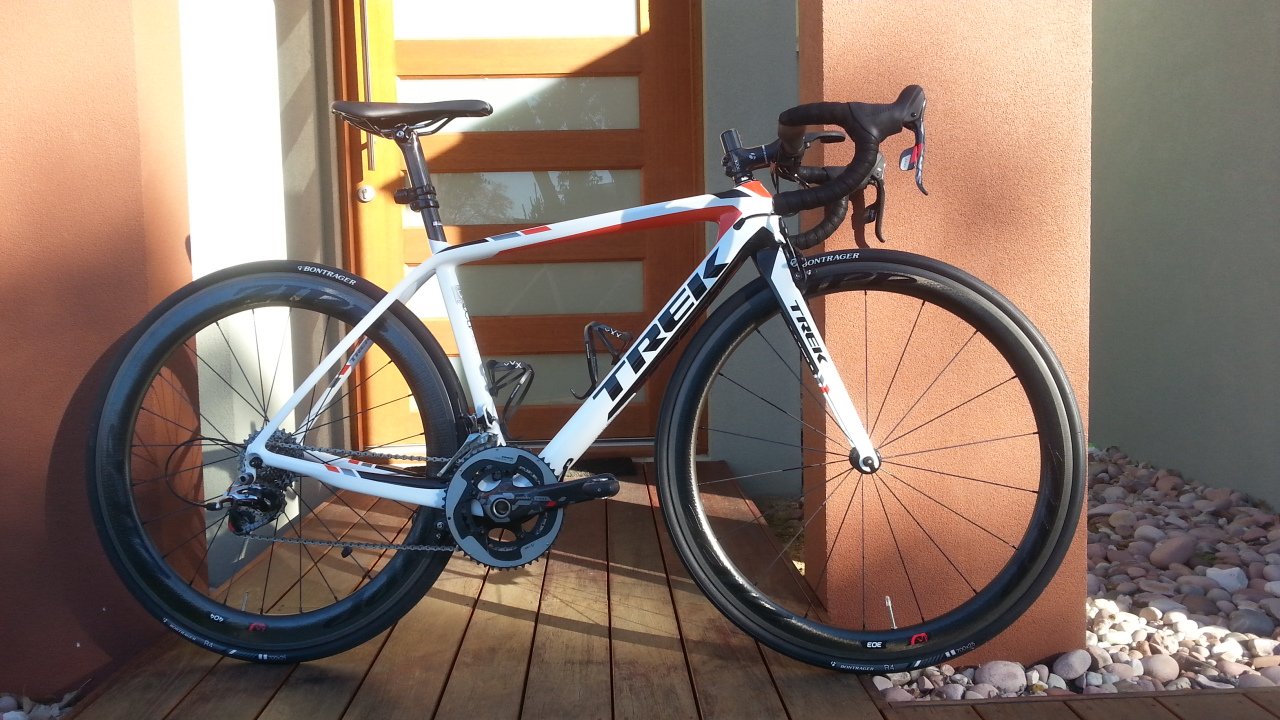
– Trek Madone 5.9 2014
– and finally Trek Madone 7 2014 which is my current bike
I still keep my Roubaix S-Works as a backup and is actually used by my wife but the rest I have sold. I’m the sort of a guy that likes to just have one ultimate bike for everything; that is from commuting to sportif events, etc.
How I ended up with Trek Madone 7 in the end was a long story. My Tarmac was stolen and bla bla bla so I get a replacement cover from the insurance and after an extensive research I decided to get the Trek Madone 2014.
NOTE: I have only owned the bike for about 2 weeks. Therefore, a long-term review is still coming.
So anyway, on this post I would like to share with you my initial thoughts over these past 2 weeks of my latest weapon. I will also compare it with the other bikes I’ve ridden previously.
UPDATE
Long term review has now been posted. See this article below:
http://www.tfsconsulting.com.au/trek-madone-7-2014-long-term-review-long-hill-ride/
MY RIDING PROFILE
– Never race
– Daily commute of about 40km a day then weekend rides ranging from 60-130km
– Height: 170cm
– Weight: 72.5kg
– Flat speed: 32-35kmh @ 150-165bpm
TREK MADONE 2014 SPECS
Size: Small 53.4cm top-tube
Stem: 90mm Bontrager XXX
Wheels: Zipp 303 Firecrest 2014 front, 404 Firecrest 2014 rear
Crank: 170mm
Groupset: SRAM Red
Handlebar: 420mm Bontrager XXX Aero
Seatpost: Bontrager RXL
Pedals: Speedplay Frog Titanium
Shoes: SIDI Drako Carbon SRS Venice
Helmet: Giro Ionos
Bottle cages: Bontrager XXX
Tires: Bontrager R4 (came with the bike) which has now been replaced with Gatorskin. More on this later.
Brake pads: Swiss Stop Black Prince
Weight: 6.8kg including pedals and bottle cages
MY REVIEW
On Trek Madone 7 2014
Purchase and Build Experience
I built it through the Project 1 website. Zipp wheels were obviously not available from the website so I sourced them separately. My initial reaction when I went to Project 1 website was, “Dang..this thing is expensive”. In all honesty, I previously would like to get Canyon instead because of their value for money; but since they didn’t ship to Australia, and when I went to Europe I didn’t visit Germany (ie. where their factory is) then I get the Trek. There are some other top of the range bikes that – with the same specs – cost $2K less than the Trek such as Focus, Canyon, Lapierre, Giant and some other ones. But I simply couldn’t get my eyes off the Trek. It just looks beautiful and made in America. So I thought, “OK then…this will be the bike that I would keep for a long long time”. Hence, the purchase.
The way it works is, Trek does not build the bike but rather they would send all the parts to an LBS then they get to build it. So you would surrender your fate to the LBS =O I went through Bike Force Joondalup for the purchase. Customer support is very friendly and by reading some reviews off Google, it seems that people are generally happy with their experience. From the date of purchase the bike was shipped from Trek after about 30 days. Apparently they needed to custom build the frame, paint it, etc. Once it was shipped the bike arrived within a week!
Once it arrived, Bike Force Joondalup just get onto it straight away which I love! Some other LBS would take few weeks to build your bike ie. it’s not a priority for them. But not with BFJ. The bike was built and ready for a pick up on the next day. So on the day of the pick up I planned to commute from BFJ to my work place in Perth CBD. The distance was about 30km. I was dropped off by my wife then I get to ride my ultimate weapon to the office…yay!
Initial 30km
The road from Joondalup to Perth was undulating. It has some 8-10% inclines for about 200-600m long. It has some descends and flats but no long hills. My initial impression was: the bike is forgiving. I would say that the comfort level is between Roubaix S-Works and Tarmac S-Works. My Tarmac was harsher than the Madone hands down. So, does it mean that the Madone isn’t as stiff as the Tarmac? Don’t get it wrong! When the road goes up, that’s when the Madone truly shines. Oh I wish I can put it into words….the bike just wants to dance. It’s super stiff meaning that there is no lost energy. Every pedal stroke takes you upward. Standing or seated doesn’t matter…in fact, compared to the other bikes I’ve ever owned, the Madone gives the best sensation while standing during climb. Some other bikes I’ve owned felt duller especially the Chinese moulds and Roubaix. Because of the longer wheelbase, the Roubaix kind of drags you back while climbing.
In terms of the feel of the bike, my Roubaix feels pretty “thin” and “skinny”. My Tarmac feels “beefy” especially on the down-tube area. The Madone just feels perfect. You will never lose contact with the bike nor the road. I would say that this is the best bike I’ve ever owned. The Merida Reacto was a great bike too but because it was an aero-shape bike, the rear feels heavy especially during climb. But not the Madone…oh man…I definitely put my money into the right bike.
Descending on Madone was very stable too. It points to the direction that you point it to. My Roubaix on the other hand was very twitchy on descend.
The Bontrager R4 was great too. Very supple and fast. It has very low rolling resistance.
Sram Red groupset is also very crisp. I have used Dura-Ace DI2 on my Tarmac but didn’t quiet like it to be honest. I prefer mechanical groupset instead. The Sram Red is truly my favourite. Smooth when riding and crisp when switching.
On that day I didn’t experience any rear brake rubs as experienced by other Madone owners/testers.
You can say that all these amazing feelings I experienced on the Madone was due to the fact that the bike was brand new…and that’s true! Now that I’ve owned it for about 2 weeks there are some gotchas that you need to be aware of.
My 2 Weeks Review
Now that I’ve owned the Madone for 2 weeks, there are some things that make the Madone imperfect. Well, there is nothing perfect in this world anyway.
In terms of riding experience ie. stiffness, comfort, etc they’re all still the same as my first day. No doubt, this bike shines the most when the road goes up or down. Super stiff, wants to dance and very stable on the descend. On flat it is not as harsh as my Tarmac. On some of the hard surface I ride on daily, I have to stop pedaling with my Tarmac because it’s just that harsh but not with the Madone. Obviously the Roubaix is the most comfortable but the Madone will do it for me.
So the first bad thing I want to talk about is the Bontrager R4 tire. I got a puncture on the rear wheel only after 110km into it. Was very disappointed. I saw a fairly large cut. This never happened with my other tires. At least they normally hold for 500+ km.
The second thing is the rear brake rub. In these 2 weeks I have had 1 week worth of rains and yes debris build up on the rear brake pad quicker than if the brake would have been located at the top. Due to the distance between the pad and the wheel that is pretty close, the debris simply rubs on it. You can feel the rub as soon as you put in power by simply standing on a hill or sprinting. Then as debris build up more and more, it simply just rubs all the time even on flats.
On one of these rainy days I actually got a puncture after about 30 minutes into the ride. I’m not sure if it was because of the rub or not but one thing I can tell you is: when I checked my rear wheel I saw the water surrounding the wheel was bubbling. I’m not joking. That’s when I realise that it could have probably been because of the rub that cause heat build up – especially on carbon wheel – which then punctured the tube. I had to then take off one of the brake pad spacers out so that the space distance between the pad and the wheel is a bit bigger. The space setter on the rear brake was actually located so close to the crank and that didn’t help either. I can never reach it with the allan key I have unless I took off my crank….this is just crazy.
The other thing I’m still struggling with is to ride the Madone hands-free. I don’t have any problem with my other bikes but not the Madone. Maybe I’m not used to it yet or probably the stability is affected by the wind due to the deep 303 rim at the front? I’ll keep on trying and see if I will eventually succeed.
On Zipp 303 Firecrest Front and 404 Firecrest Rear
This is the first time I own an expensive wheelset. Normally I would buy Chinese open-mould wheels. I’m not a big fan of deep dim and anything above 35mm is normally too deep for me. So Zipp 303 and 404 have always been out of equation for me. Deep rims are more prone to side/cross wind (which is the case most of the days here in Perth, expect 20-35kmh cross-wind daily) and are also heavier even though you may get aerodynamics advantage out of it. I like climbing and I’ve ever had a 60mm Chinese carbon wheelset and was quiet heavy.
But this time I changed my mind.
The reason why I get the 303 and 404 is because they are quiet light. Plus, with the new Firecrest shape Zipp says that it’s not prone to side/crosswind. So I thought with all the benefits I get plus the extra aerodynamics advantage, I took the plunge.
The wheels I’m comparing to are Mavic R-SYS SL 2011, Dura-Ace C35 2012 (came with the Merida Reacto I used to have) and Chinese open-mould carbon wheels.
These Zipps definitely do not disappoint. They are fast and more comfortable compared to the C35. Compared to the C35 the Zipps definitely transmit less vibration to your body. The most comfortable wheelset I’ve ever had however is the Mavic R-SYS SL. Although, the Mavic is the least aerodynamics. I hate riding them during windy days…just felt so slow.
The Zipps are lighter than the Chinese open-mould carbon. On climbing I didn’t feel any drags at all while on the Chinese open-mould – could probably due to the weight – I felt as if I was pulled back a little bit. I don’t feel any heavier than the Mavic R-SYS SL either even though the R-SYS are few hundred grams lighter.
Braking is good too especially when combined with the Swiss Stop Black Prince. On the rainy days they stop as immediate as if it is on summer days. These Zipps has a fairly large braking surface too so tuning it to your bike will not be so hard.
What I love the most about these wheels is the fact that changing tire is a lot easier! Dang…I have to say this is probably the easiest wheelset I’ve ever owned to change tire on! Even though they are deep rims (45mm for 303 and 56mm for 404), changing tire is just easy peasy!
CONCLUSION
Hands down the Madone – despite its “flaws” with rear brake rub and the rear brake setting – is the best all-around bike I’ve ever owned. It’s definitely the bike I’m looking for. All these times I’ve been looking for a good all-rounder and now I’m satisfied to ride on this bike.
WHERE TO GO FROM HERE?
I still want to do a long hilly ride 130km+ with at least 1500m elevation to further test the bike.
PHOTOS
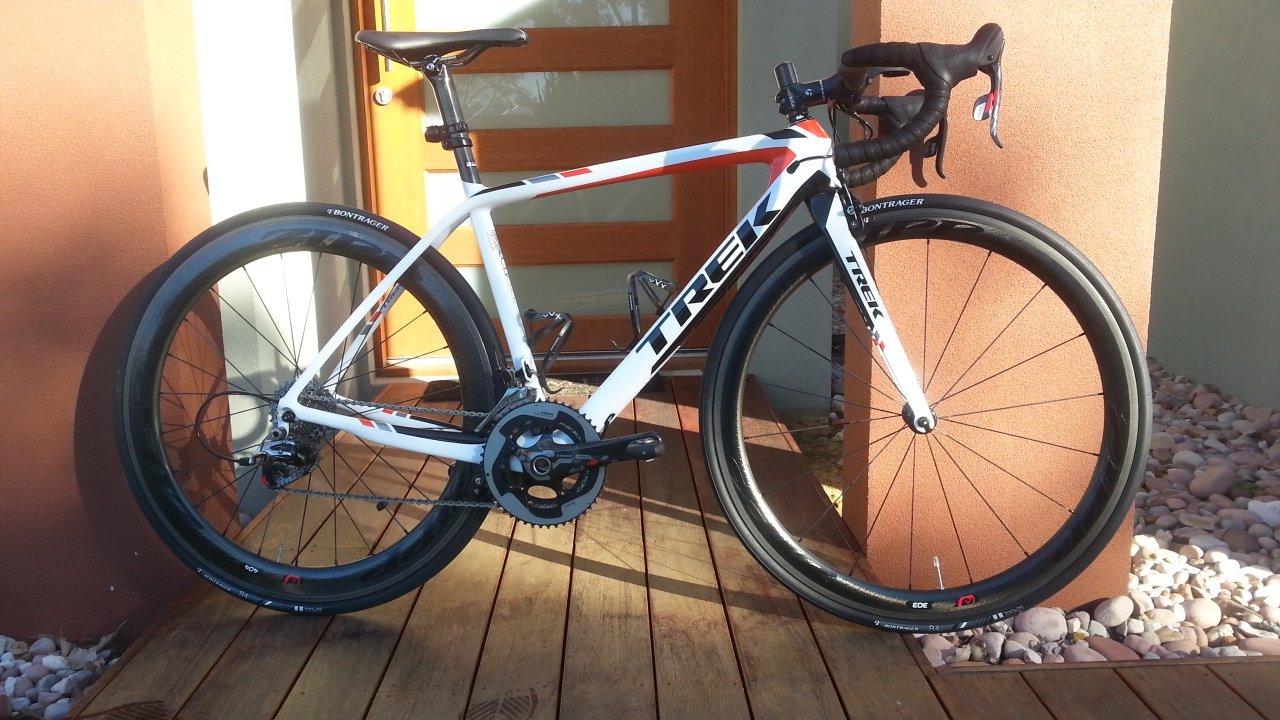
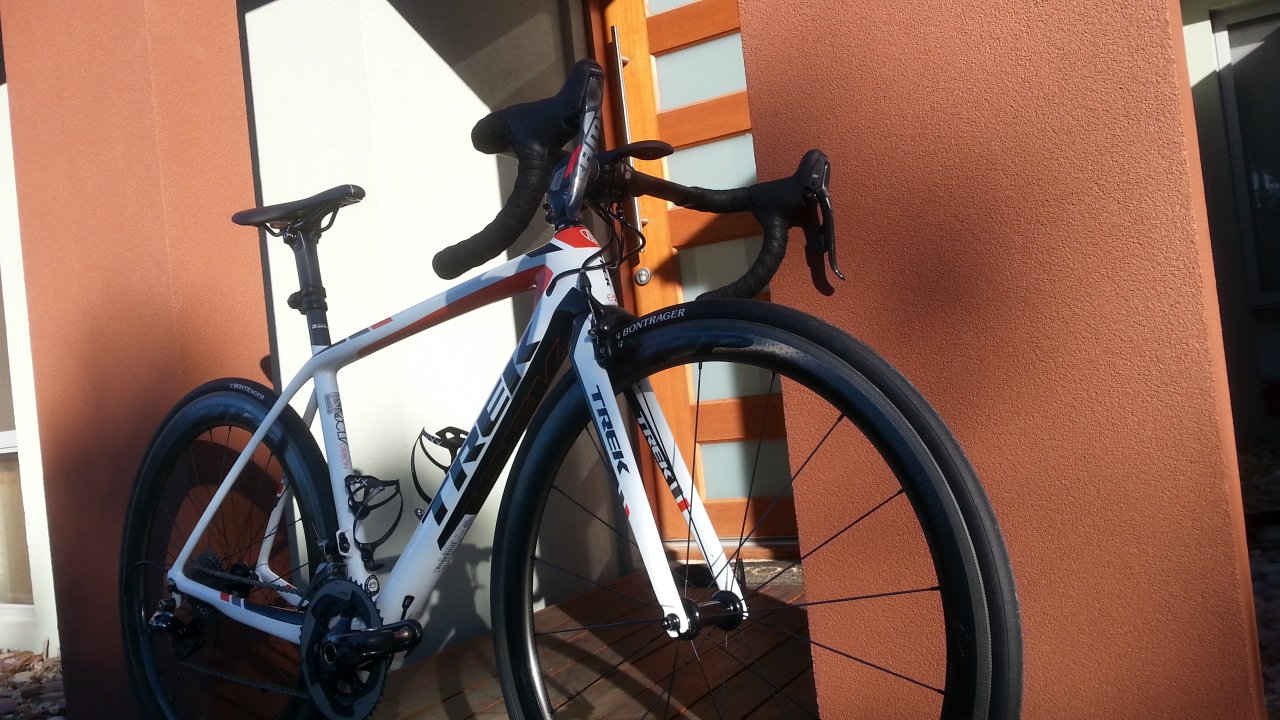
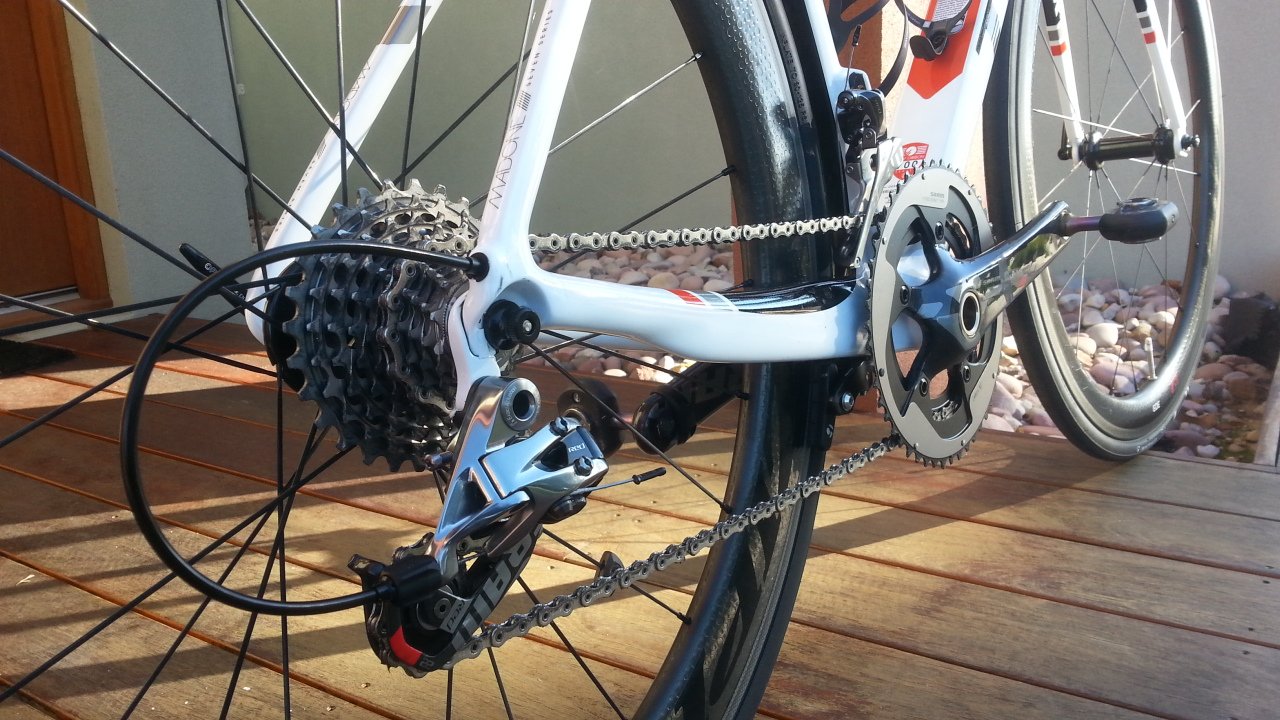
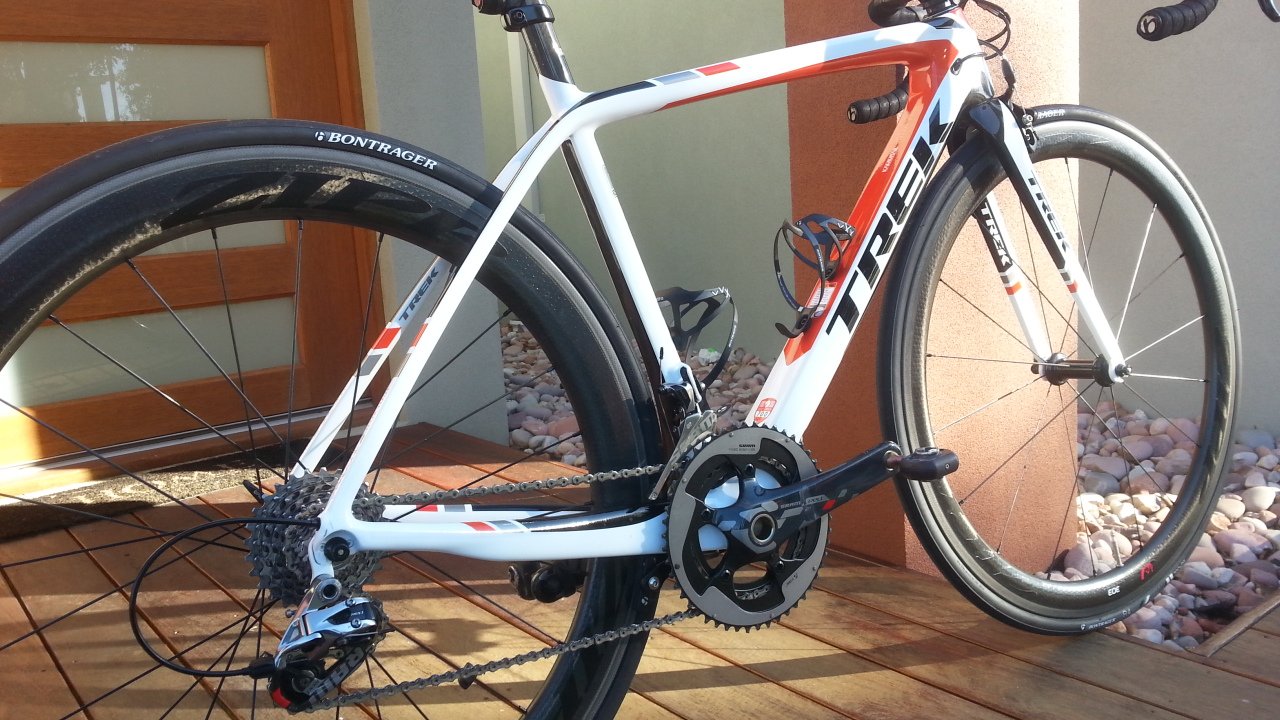



, - Posted by Tommy Segoro
INTRODUCTION
I was in the process of setting up Service Application publishing. I did not know why I did it but anyway in the source farm I updated the certificate for SharePoint Web Services IIS website. This website by default uses the SharePoint Services root certificate. When you update the certificate to your own, you will start having authentication issues on the destination farm that tries to consume/connect to the published service application. The error is something like below:
An operation failed because the following certificate has validation errors:
Subject Name: CN=WMSvc-[SERVERNAME]
Issuer Name: CN=WMSvc-[SERVERNAME]
Thumbprint: A3987F15C3D7A3E21E995832245B951F96565197
Errors:
SSL policy errors have been encountered. Error code ‘0x2’..
Basically the error is saying that your certificate is invalid. Service Application publishing is using the SharePoint Web Services as the proxy. So I now have the mission to revert back to certificate to use the SharePoint Services one.
RESOLUTION
In a nutshell the steps are as follows:
1. Grab the ApplicationID of the SharePoint Web Services IIS website.
2. Add the SharePoint Services certificate to your Personal store. By default this resides in SharePoint Certificates store and if you don’t move it to the Personal store you may get 1312 error which I will explain later.
3. Then use netsh command to re-assign the certificate back to the SharePoint Web Services website.
So in detail please follow the following:
Grab the ApplicationID
– Go to Command Prompt, open it with “Run as Administrator”
– Then run:
netsh http show sslcert
This will show you ALL IIS websites that listen on HTTPS protocol. You want to grab the ApplicationID for the 0.0.0.0:32844 which is the SharePoint Web Services’ one. If somehow the website is not listed, simply go to IIS and assign a self-signed certificate to the SharePoint Web Services then re-run the command.
Copy and paste Application ID into Notepad.
Add the SharePoint Services certificate to your Personal store
– Open command prompt and run mmc.exe.
– Then add snap-in for the Certificates of Local Computer account.
– Then go to SharePoint > Certificates node.
– Export the SharePoint Services certificate including the private key to your local drive.
– Then go to Personal > Certificates node and import the SharePoint Services certificate you’ve exported from your local drive.
– After you’ve imported back, go to the SharePoint Services certificate details page by double-clicking the certificate. Then go to Details tab. You want to go to the Thumbprint section. Copy and paste the value into Notepad but remove all the spaces such as below:
c4be09de84f708f8549d32c55ef298e0b3f7ab93
NOTE: Some other blog posts I’ve found on the net tell you to get the Thumbprint directly from the SharePoint Services cert located in SharePoint > Certificates store. I did that and somehow I get error 1312 Parameter is incorrect.
Run netsh command to re-assign certificate
– This is the last step. Open command prompt again “As Administrator”.
– Then run:
netsh http add sslcert ipport=0.0.0:32844 certhash=<thumbprint> appid=<application ID>
eg.
netsh http add sslcert ipport=0.0.0:32844 certhash=c4be09de84f708f8549d32c55ef298e0b3f7ab93 appid={4dc3e181-e14b-4a21-b022-59fc669b0914}
That’s it! Now your SharePoint Web Services IIS website uses the correct certificate again.
Hope this helps,
Tommy
, - Posted by Tommy Segoro
INTRODUCTION
Seems that the rsProcessingAborted CRM SQL report (SRS) is one of the most common errors we are getting with the MS CRM system. There are few things that cause the error and I hope that through this article it helps you resolving it.
In a nutshell, the error means nothing else than “there is an error in rendering the report”. It does not denote any particular cause behind it. This article would tackle all of possible causes of the issue and if you apply all of them, it should resolve the issue for good.
NOTE: I’m using CRM 2011 for this article but the resolution should also apply for CRM 2013. This article is only based on my experience only. If you know some other causes of the error that are not yet detailed on this article please let me know. Thanks so much in advance.
CAUSE + RESOLUTION 1: KERBEROS and SETSPN for Custom Reports
The most common cause for this error is the SETSPN command that you need to execute. This is applicable to any custom reports you develop. Out of the box reports are normally working OK but custom reports are not. Therefore, to resolve this issue please follow the following:
1. Go to Active Directory Users and Computers and go to the domain account that you are using as the CRM App Pool. In my case is DOMAIN\crmapppool. Right click then Properties.
2. Go to Delegation tab and select “Trust this user for delegation to any service (Kerberos only)”.
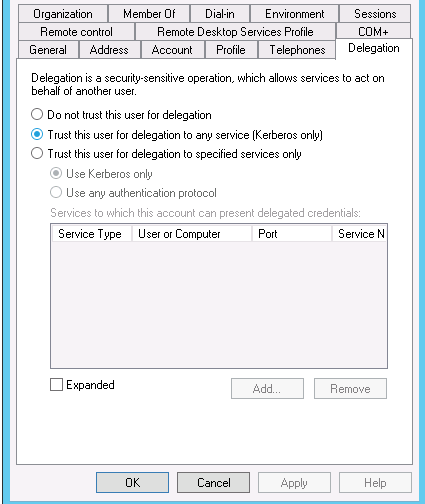
3. Go to your CRM server, open IIS and go to your Microsoft Dynamics CRM website node. Then click on Authentication. Ensure the following are enabled:
– Anonymous Authentication
– ASP.NET Impersonation
– Windows Authentication
4. Select Windows Authentication then Advanced Settings. Ensure Enable Kernel-mode authentication is checked. Set Extended Protection to Off.
5. Click Providers. Ensure the following are in the correct order:
– NTLM
– Negotiate:Kerberos
6. Then run the following commands from the CRM server:
setspn -s HTTP/<servername> <app pool account>
setspn -s HTTP/<servername in full qualified domain name> <app pool account>
for example:
setspn -s HTTP/CRM01 DOMAIN\crmapppool
setspn -s HTTP/CRM01.dev.local DOMAIN\crmapppool
CAUSE + RESOLUTION 2: CRM App Pool accounts do not have correct permission in Reporting Service
Go to your /Reports URL and ensure the CRM service accounts (eg. CRM app, sandbox, async, deployment) have correct permission in Reporting Service.
Two areas you need to look for:
– In Site Settings (top right hand corner). Ensure those accounts have roles defined. To be safe I gave them System Administrator.
– In Folder Settings (homepage of /Reports). I gave them all roles eg. Browser, Content Manager, My Reports, Publisher, Report Builder.
CAUSE + RESOLUTION 3: Incorrect SRS Data Connector version
In my scenario I have 2 CRM server running: one is using CRM 2011 and another one is CRM 2013. Both are connected to the same SQL server but running 2 instances. One instance is dedicated for 2011 and another one for 2013 respectively.
I tried to use the SQL Server to host the report server. The problem is, you can only install one SRS Data Connector per server. Meaning that you can’t install both 2011 and 2013 SRS Data Connector all at the same time.
I installed CRM 2013 (with SRS Data Connector) first then CRM 2011. When I tried to install SRS Data Connector 2011 it prompted me with “Repair, Uninstall” window which I did not want. Then I realise you can only install 1 instance of SRS Data Connector per server. Therefore, I now point my CRM 2011 to use 2013’s SRS Data Connector.
The CRM 2011 install went perfectly except when it comes to loading the reports. Both custom and OOTB reports don’t work even though I’ve done Resolution 1 and 2 (as above).
I then realise that it’s caused by the incorrect version of SRS Data Connector.
Therefore, the only way for me to fix this is to install SSRS on the CRM Server because the instance in the SQL Server is already occupied by the 2013’s.
This now fixes the error.
I hope this helps,
Tommy
We provides you the best Services in our themes.
Click on the link below to see a full list of clients which we have developed solutions and provided consultancy for.
We are solution-centered and not application-centered.
Being creative and having fun and yet still delivering a fantastic service is the center of our values.
TFS Consulting Services guarantees delivery that is within budget and deadline or you engage us for free.

Implementing IT solution does not have to be difficult. TFS Consulting Services has a lot of resources on planning and methodologies that will ensure successful delivery of your IT solution. TFS Consulting Services has been around in the web industry for more than 10 years and has experienced all the successes and failures of various type of IT deployment.

Do you need a technical resource? TFS Consulting Services can also provide you with technical resource for developing ASP.NET (C# and VB.NET), SharePoint (2003, 2007, 2010, 2013) and MS CRM applications. Our resource is an Microsoft Certified Personnel (MVP) and Microsoft Certified Technology Specialist (MCTS) in all ASP.NET, SharePoint and CRM.

Make sure your IT implementation is robust and scalable. TFS Consulting Services can provide consulting and advice on industry’s best practice on various web-related areas such as website security, design and usability, application-specific (such as SharePoint)’s best practice, Search Engine Optimisation (SEO), coding standards and many others.

Finally TFS Consulting Services provides you with solution development service. We mainly work with Microsoft technologies (ie. .NET and SQL Server), however we are also capable of developing with PHP and MySQL. If you ever need any business process automation, integration and solution development work, we are the trusted expert you should go to.
For more detailed service offerings please visit our Solutions page.
Tommy Segoro
tommy@tfsconsulting.com.au
+61 404 457 754
© TFS Consulting Services 2026. All rights reserved.