, - Posted by Tommy Segoro
I just played around with Reusable Workflow functionality in Sharepoint Designer 2010. It’s very-very cool I have to say. I really can see the potential with this functionality if all of the bugs are fixed.
Basically what you can do with this is, you can create a Reusable Workflow on a particular site, export it as WSP, restore it into Visual Studio then deploy it to another Sharepoint site.
So in theory, you don’t have to re-create the workflow (unlike MOSS and SP Designer 2007).
However, I’ve found some limitations:
– If you create an IF condition and uses “Current Item” value for checking the value against, there is only a set of limited fields that you can check against: Content Type, Created, Created By, ID, Modified, Modified By and Title.
– It’s still buggy. Workflow that has “Collect Data from User” task doesn’t work properly. I personally uses this functionality heavily.
Collect Data from User Bugs
Below is the list of bugs I found:
– By default if you’re using the default Tasks list, the workflow will simply stop and crash. There was an error message in the workflow history. The workaround for this will be to create a new task list.
– You will not get the nice “collect data” page on the destination site. Somehow it redirects you to the “View Item” (DispForm.aspx) page.
General Bugs
– By default when you first load WSP into Visual Studio, if you open Elements.xml, VS/Sharepoint appends Instantiation URL which if you deploy it to the destination site will create an error when you try to start the workflow manually. The error was: “The workflow template has specified no FormURN for this page”.
Conclusion
For general simple workflow, this functionality has worked really great. It’s just when you start trying to do a bit more complicated stuff (eg. collect data from user, etc), it isn’t that functional. But I’m hopeful that this will be fixed and improved on the released version.
Cheers,
Tommy
, - Posted by Tommy Segoro
I created an InfoPath 2010 BETA form then attached an EventChanged event on a drop-down-list.
I did a bit of programming and I then tried to debug my code. Whenever VS hit a break-point or an error IT CRASHED! ARRGHGHGHGH….
See images below:

Before Debugging

During Debugging

Killing the Process
Resolution
When I hit F5, it opened a preview instance of the InfoPath form and created a new worker process INFOPATH.EXE. I had to kill it via Task Manager so that I could go back to the editing mode of Visual Studio.
I hope that this will be fixed on the released version.
Cheers,
Tommy
, - Posted by Tommy Segoro
I tried to play around with InfoPath 2010 last night and to be honest, I didn’t see anything different from Office 2007. At this stage all I can say is, there is no improvement just yet in terms of InfoPath development.
I’ll try to play around more and post more updates on this article.
Cheers,
Tommy
, - Posted by Tommy Segoro
I tried to save a custom list as a list template (STP) and ticked “Include Content”.
When I restored the list template on an another site collection, the content wasn’t there at all.
Cheers,
Tommy
, - Posted by Tommy Segoro
I’ve recently installed Office 2010 BETA and now when I tried to create a new document via Sharepoint, below is what I get:
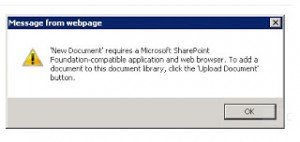
Hm….has anyone had this problem before?
Cheers,
Tommy
We provides you the best Services in our themes.
Click on the link below to see a full list of clients which we have developed solutions and provided consultancy for.
We are solution-centered and not application-centered.
Being creative and having fun and yet still delivering a fantastic service is the center of our values.
TFS Consulting Services guarantees delivery that is within budget and deadline or you engage us for free.

Implementing IT solution does not have to be difficult. TFS Consulting Services has a lot of resources on planning and methodologies that will ensure successful delivery of your IT solution. TFS Consulting Services has been around in the web industry for more than 10 years and has experienced all the successes and failures of various type of IT deployment.

Do you need a technical resource? TFS Consulting Services can also provide you with technical resource for developing ASP.NET (C# and VB.NET), SharePoint (2003, 2007, 2010, 2013) and MS CRM applications. Our resource is an Microsoft Certified Personnel (MVP) and Microsoft Certified Technology Specialist (MCTS) in all ASP.NET, SharePoint and CRM.

Make sure your IT implementation is robust and scalable. TFS Consulting Services can provide consulting and advice on industry’s best practice on various web-related areas such as website security, design and usability, application-specific (such as SharePoint)’s best practice, Search Engine Optimisation (SEO), coding standards and many others.

Finally TFS Consulting Services provides you with solution development service. We mainly work with Microsoft technologies (ie. .NET and SQL Server), however we are also capable of developing with PHP and MySQL. If you ever need any business process automation, integration and solution development work, we are the trusted expert you should go to.
For more detailed service offerings please visit our Solutions page.
Tommy Segoro
tommy@tfsconsulting.com.au
+61 404 457 754
© TFS Consulting Services 2026. All rights reserved.