, - Posted by Tommy Segoro
I tried to save a site as WSP and then when I restored it I get the following error:
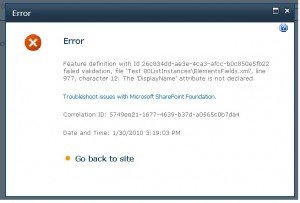
This error was caused by a workflow that I attached to a list of which it has custom Collect Data from User task. I tried to collect 2 fields from a user:
– Manager Approval (choice with 2 values: Approve and Reject)
– Manager Comment (multi-text field)
I then opened the WSP and open ElementsFields.xml. I found out that somehow Sharepoint appended the following for the Approval field:
<Field Name=”FieldName_C830E315_F175_4656_8A4A_F7162BAB4141_” Format=”Dropdown” Type=”Choice” BaseType=”Text” DisplayName=”Manager Approval” Description=”” Direction=”None” ID=”{60ad5230-f828-4831-9d73-3563655b8a01}” SourceID=”{af99aa24-3ce2-458a-a028-ee9e28c98709}” StaticName=”FieldName_C830E315_F175_4656_8A4A_F7162BAB4141_” Overwrite=”TRUE”>
<CHOICES>
<CHOICE DisplayName=”Approve”>Approve</CHOICE>
<CHOICE DisplayName=”Reject”>Reject</CHOICE>
</CHOICES>
</Field>
On a choice field there is no DisplayName attribute and that’s what failed it.
I hope that this will be fixed on the released version.
Cheers,
Tommy
, - Posted by Tommy Segoro
In Visual Studio 2010 you can actually modify the deployment configuration and steps. By default you will get the following:
– Default
– No Activation
Default
With the default one, when you do “Right Click -> Deploy” VS will then retract your solution, re-deploy your latest solution and re-activate the features.
No Activation
With this option it will do as Default except it won’t activate the features.
You can also create your own deployment step. However, the list of steps are quiet limited. You can only choose from the following:
– Run Pre-Deployment commands
– Recycle IIS Application Pool
– Retract solution
– Add solution
– Activate features
– Run post-deployment commands
It would be nice to have an “Upgrade” option. The reason is because, with content types and columns especially, since they’re the core of Sharepoint development project, if you try to retract, re-add solution then re-activate the feature that deploys content types and features, it may break your Sharepoint site completely.
Plus, if you have a feature that creates content (eg. pages and sites) programatically, you obviously will not want it to be activated twice.
I tried to also open the .csproj file with the hope that I can somehow “hack” it but it actually calls a class with namespace:
<DeploymentConfiguration Name=”Upgrade Solution”>
<DeploymentSteps>Microsoft.VisualStudio.SharePoint.PreDeploymentCommand;Microsoft.VisualStudio.SharePoint.RecycleApplicationPool;Microsoft.VisualStudio.SharePoint.RetractSolution;Microsoft.VisualStudio.SharePoint.AddSolution;Microsoft.VisualStudio.SharePoint.PostDeploymentCommand</DeploymentSteps>
<RetractionSteps>Microsoft.VisualStudio.SharePoint.RecycleApplicationPool;Microsoft.VisualStudio.SharePoint.RetractSolution</RetractionSteps>
</DeploymentConfiguration>
Therefore, at this stage I still don’t know how to add my own “Upgrade” deployment step.
Hopefully this will be fixed in the released version of VS 2010.
** UPDATE **
This article actually mentions what I want to exactly do:
http://msdn.microsoft.com/en-us/library/ee256698(VS.100).aspx
I’ll try that soon and let you know how it goes.
Cheers,
Tommy
, - Posted by Tommy Segoro
I just noticed that when you add a linking Module in your VS 2010 for your custom Feature project, and when you add a file into the module, VS 2010 automatically marks it as a ElementFile.
When I tried to develop custom content types and fields, I needed to add 2 XML files into the module (eg. ContentTypes.xml and Fields.xml) and they have to be marked as ElementManifest instead of ElementFile. If I don’t do this, the custom content types and fields won’t be loaded in Sharepoint at all.
To do that, edit your Module .spdata file and modify the content manually:
<ProjectItem Type=”Microsoft.VisualStudio.SharePoint.Module” SupportedTrustLevels=”All” SupportedDeploymentScopes=”Web, Site” xmlns=”http://schemas.microsoft.com/VisualStudio/2010/SharePointTools/SharePointProjectItemModel”>
<Files>
<ProjectItemFile Source=”Fields.xml” Target=”FeatureSP2010TestContentTypes” Type=”ElementManifest” />
<ProjectItemFile Source=”ContentTypes.xml” Target=”FeatureSP2010TestContentTypes” Type=”ElementFile” />
</Files>
</ProjectItem>
Hope this helps,
Tommy
, - Posted by Tommy Segoro
PLEASE FOLLOW YUBIN’s COMMENT BELOW. THANKS FOR YOUR HELP YUBIN.
I’ve arrived at a stage where I wanted to create my own custom Sharepoint solution using Visual Studio 2010.
When I created a new blank Sharepoint project it asked me whether I want to deploy the solution as a Sandboxed Solution or a Farm Solution.
I first selected Sandboxed Solution but then I found out that I couldn’t build and package my solution when I had a Sharepoint Mapped Folder within it.
Therefore, I needed to change the type of the deployment to Farm Solution. I looked everywhere (from Project Properties, Solution Properties, etc) and I couldn’t find the setting for it.
I tried to re-create the project and now selected Farm Solution as the deployment type and I then tried to compare the project properties manually. This included opening the .csproj file in Notepad and compared between the two apple-by-apple.
I noticed the following missing tag within the project file (.csproj) that was deployed as Sandboxed solution:
<SandboxedSolution>False</SandboxedSolution>
I added that tag to my .csproj and now my Sandboxed Solution project suddenly became Farm Solution project.
Hope this helps,
Tommy
, - Posted by Tommy Segoro
So far I’ve found the following bugs (or things that can be improved in later releases):
– Administration breadcrumb is all over the place. It’s really-really hard to navigate to where I was before without going back to the main Central Admin screen. Especially when I was in a particular Service Application page, the breadcrumb didn’t trail correctly. It only displayed Central Administration > Current Page.
– User Profile Sync page didn’t display information correctly. I have started my sync process but the page keeps saying: “Idle – Completed in 0h 0m 0s”. And even worse I still saw the link saying “Start Profile Synchronization”. As a user I thought there must be something wrong with the process. I clicked on the link again and now it gave me popup error message saying User Profile sync is still running bla bla bla.
– As mentioned on various blogs, when you first started the User Profile Sync service it keeps saying “Starting” until you visit the Monitoring – Job Status page and waited until the process is finished, that’s when Service page will say “Started”. See http://blogs.msdn.com/opal/archive/2009/11/19/user-profile-sync-setup-in-sharepoint-server-2010-beta.aspx.
– It couldn’t crawl AD unless I’m using the service account to login to the farm. I was trying to login using the account that I used to install Sharepoint (SEGORO\sp_admin) – which I assumed it would be the “God” mode account – which it was in MOSS 2007 – and it still failed. I had to use SEGORO\sp_farm instead.
– It would be handy if stsadm (and other Sharepoint-related commands) command can be added to Environment Variables automatically upon installing Sharepoint since we (the SP developers) will be using these so much.
That’s what I’ve found so far, I’ll keep posting the bugs I found on SP 2010 Beta.
We provides you the best Services in our themes.
Click on the link below to see a full list of clients which we have developed solutions and provided consultancy for.
We are solution-centered and not application-centered.
Being creative and having fun and yet still delivering a fantastic service is the center of our values.
TFS Consulting Services guarantees delivery that is within budget and deadline or you engage us for free.

Implementing IT solution does not have to be difficult. TFS Consulting Services has a lot of resources on planning and methodologies that will ensure successful delivery of your IT solution. TFS Consulting Services has been around in the web industry for more than 10 years and has experienced all the successes and failures of various type of IT deployment.

Do you need a technical resource? TFS Consulting Services can also provide you with technical resource for developing ASP.NET (C# and VB.NET), SharePoint (2003, 2007, 2010, 2013) and MS CRM applications. Our resource is an Microsoft Certified Personnel (MVP) and Microsoft Certified Technology Specialist (MCTS) in all ASP.NET, SharePoint and CRM.

Make sure your IT implementation is robust and scalable. TFS Consulting Services can provide consulting and advice on industry’s best practice on various web-related areas such as website security, design and usability, application-specific (such as SharePoint)’s best practice, Search Engine Optimisation (SEO), coding standards and many others.

Finally TFS Consulting Services provides you with solution development service. We mainly work with Microsoft technologies (ie. .NET and SQL Server), however we are also capable of developing with PHP and MySQL. If you ever need any business process automation, integration and solution development work, we are the trusted expert you should go to.
For more detailed service offerings please visit our Solutions page.
Tommy Segoro
tommy@tfsconsulting.com.au
+61 404 457 754
© TFS Consulting Services 2026. All rights reserved.