, - Posted by Tommy Segoro
So, at this stage you have gathered the requirements, selecting domains, colours, etc. It’s now time to do the website analysis.
As part of this series: DOWNLOAD Business Requirements Document Template FOR FREE! You’ll need to add the web site designs and mockups in the document.
Let’s determine our goal first. The goal of this exercise is to come up with design ideas. We will now decide what menu we’re going to use, what it’s going to look like, what breadcrumb and left navigation controls we’re going to use, what programming language we are going to use, etc.
Selecting professional web site designs
Based on the approved site structure and colour theme, it’s now up to us to determine how we’re going to design the site. I personally start from http://www.templatemonster.com to get some ideas. There you can select thousands of website templates that have been designed by professionals. I wouldn’t mind purchasing if a particular design looks really-really good.
Determining how to approach the design
Once you’ve selected the design, it’s now time for us to determine how we would approach it. For example, on a particular design that we’ve selected there is a drop-down menu. We have to determine how we can develop that drop-down menu. Whether we’ll need a Javascript or third-party vendor control or whatever.
There will be other elements of the design that require development. Some may need programming. These include image buttons, navigation controls, footer, header, etc.
Determining how to approach functional requirements technically
On the website requirements that you’ve collected before, client may need a latest-news roller on the homepage. We will now need to determine how we can make this happens. Whether we’ll be using database to store the news, or file system, or XML file, etc it is all part of this exercise.
There may be another requirement to have a contact form on the site where visitors can post an enquiry online and the posted enquiries can be retrieved later. It’s our job to determine how we’ll approach this.
Conclusion
In a nutshell, this step really gets us to do a bit of research and planning so that we have ALL the resources we need to develop the end product: the professional web site!
Remember, even with a lot of planning, things can still go wrong. They will just go even worse if there is no planning at all. So, before we’re touching any code, let’s get the planning right.
Until next time,
Tommy
, - Posted by Tommy Segoro
In this opportunity I would like to talk about the requirements gathering phase of designing and developing professional websites. As I’ve mentioned on my previous article, this will be the very first step that we need to do before we even start designing, coding etc.
First of all, as part of this article: DOWNLOAD Business Requirements Document Template FOR FREE!
Remember, without defining a clear goal and purpose for our professional web site, we will end up getting confused and stopping mid-way through.
What’s in It?
1. Goal and purpose of the website
During requirements gathering phase we need to define the goal and purpose of the website. For example, the website will be informational only. It won’t have the capability of visitor to signup or login.
Another example: The website will be a community website where a visitor can register and interact with the other members. He will have a profile of himself and able to upload an image, etc etc etc.
After we determine the purpose and the goal of the website, the picture will get clearer. We can start picturing what will be on our website.
Be as precise as it can be! Ask your client what they want on their website. You – as a professional website designer and developer – needs to also have some knowledge in this area. Go to various websites that are popular nowadays such as community websites (Facebook, Twitter, etc), news sites, etc. This way you can offer clients various functionalities.
Remember, that’s where the money is. The more functionalities you can offer, the more money you can make out of it.
2. Selecting the title and domain name
The next step will be for us to determine what the title and domain name of the website will be. Normally the domain name will mimic the title. For example, if the title of the website is “Tom’s Mowing” then the domain name will normally be http://www.tomsmowing.com/ or something like that.
However, from SEO (search engine optimisation) perspective, a more friendly domain name may also be selected. For example: http://www.professionalmowing.com/.
Please ask your client what the domain name will be and what the TLD he wants. TLD is the extension at the end of the domain (eg. .com, .net, .com.au, etc). Also, let your client know that the domain he wants may not be available.
Bring a laptop that has wireless/mobile internet as you can perform a quick domain search during meeting.
3. Creation of the website structure
This is the important bit. When you first publish the website, it should have some content, shouldn’t it? It’s less likely that someone publishes a website without any content. The basic content that I normally instruct client to develop is the site structure.
Website structure is normally visualised in a tree-view form. For example:
– About Us
—- History
——– 1970
– Products
– Services
—- Hosting service
—- Repair service
—- Eye test
– Contact Us
etc
It doesn’t matter if you have “Under construction, please come back later” message on every page but at least – from visitors point of view – they can see what’s coming.
Get your client to submit to you the basic site structure. If they want to be able to add more later then it’s a further matter. Without this, it will be very-very hard to design the professional website later on. As we go along hopefully you’ll start realising that all these will tie together.
4. Creation of the website layout
Normally I will create two layouts: Homepage layout and Content page layout.
What is layout anyway? Layout is the positioning of the website elements. Together with site structure, this will ease your way through when designing the website later on. Example of a layout is below:

Homepage layout

Content page layout
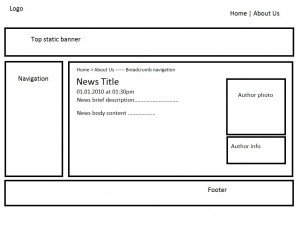
News page layout
Remember, these are only page layouts and no more. They only tell us where to position things!
We are not yet determining the design of each element (eg. color of links, shape of left navigation control, banner with gradient colours, etc).
5. Selecting colour theme based on client corporate branding
Now, this is normally the last step during this process. Ask client for their corporate branding (eg. logo) because a website is really an another realisation of client’s corporate branding, hence colours have to match!
It also makes your life easier as well when you know what colour the website you’re designing will be.
Conclusion
So, last but not least, this is really one of the most important steps in a professional website creation process. By skipping this phase we’ll end-up getting confused of what we want with the website.
I’ve been there, I’ve done that,
Tommy
, - Posted by Tommy Segoro
I would now like to share my experience in writing functional requirements into a document. You have now finished your requirements gathering meeting and now it’s time do your homework: writing functional requirements document. This is the document that will either win you the job or not.
What is functional requirements document?
Functional requirements document or sometimes called functional specification document is a document that captures and details client requirements. It’s really a physical translation from meeting minutes into a format that is readable and understood by both parties.
What’s in functional requirements document?
It’s pretty much detailing everything you’ve talked about in the meeting with the client. It details the domain name, colour theme, approved layouts, website functionalities, hosting details, price agreement, etc.
It details how the system should behave and NOT how it is implemented. The customer doesn’t need to know how it’s implemented as long as the final product does what’s required.
How to write a good functional requirements document?
It’s not hard to write a good functional requirements document. Below are some advice:
– Write with correct grammar. Get someone to proof-read the document once you’ve finished writing it.
– NEVER mentions anything technical! The document is meant to contain the requirements of the system and not HOW the system is going to be implemented. It should never say, “The website will be programmed in Visual Studio”, etc. Remember, this document is the bridge between you and the client. Both parties have to be able to understand it!
A technical specification document on the other hand talks more about the technology behind it. It talks about how to achieve a particular requirement technically. For example, to allow visitors to register we will be storing the data in SQL database and the username will be stored in session, etc. I’ll talk more about this later.
– Simple in layout heavy in content. Please download the sample functional requirements document above.
Conclusion
So, that’s pretty much it! It’s really not that hard to write a functional specification document. It really just captures what client wants out of the system.
, - Posted by Tommy Segoro
You’ve now learned how to write a good functional requirements document and now it’s time to write a technical specifications document. Is it actually needed? Well, it depends.
What is technical specifications document anyway?
While functional requirements document captures what client wants, technical specifications document layout HOW you will approach the functional requirements technically. It will be fully technical (eg. what technology you use, the database structure, etc).
For example, client needs a website that allows visitors to register. The technical specifications document will mention something like, “A ASP.NET session will be used to store visitor ID then a temporary session record will also be added to the database, etc”. Another example will be client needs to have a drop-down-menu then in the document you’ll mention, “ABC Drop-Down-Menu will be used with custom javascript”, etc.
What is the purpose of technical specifications document?
The purpose of having this document is obviously to record the “magic” behind the website you create. Therefore, if you need to re-visit the project 1-2 years later, you know what it has.
Is it compulsory?
It normally is. Writing technical doco however consumes time but trust me, it’s worth the time.
What’s in there?
So, what does this document contain?
– Technology used
– Database schema
– Any custom Javascript and other scriptings
– CSS classes used
– etc (other framework used)
We have to be diligent enough to keep updating this document as soon as our approach changes. For example, instead of saving the user to database, we will save the user to an XML file. Any technical changes have to be reflected in the document. If you get lazy (like I am), keep reminding yourself what the purpose of this document is. It’s really-really for our own benefit.
, - Posted by Tommy Segoro
City of Stirling is a local council located in Stirling, Western Australia. Tommy was hired initially to develop their public internet website. However, his engagement was being extended to also do the electronic forms project. The main technology used is SharePoint 2010.
Website URL: http://www.stirling.wa.gov.au.
We provides you the best Services in our themes.
Click on the link below to see a full list of clients which we have developed solutions and provided consultancy for.
We are solution-centered and not application-centered.
Being creative and having fun and yet still delivering a fantastic service is the center of our values.
TFS Consulting Services guarantees delivery that is within budget and deadline or you engage us for free.

Implementing IT solution does not have to be difficult. TFS Consulting Services has a lot of resources on planning and methodologies that will ensure successful delivery of your IT solution. TFS Consulting Services has been around in the web industry for more than 10 years and has experienced all the successes and failures of various type of IT deployment.

Do you need a technical resource? TFS Consulting Services can also provide you with technical resource for developing ASP.NET (C# and VB.NET), SharePoint (2003, 2007, 2010, 2013) and MS CRM applications. Our resource is an Microsoft Certified Personnel (MVP) and Microsoft Certified Technology Specialist (MCTS) in all ASP.NET, SharePoint and CRM.

Make sure your IT implementation is robust and scalable. TFS Consulting Services can provide consulting and advice on industry’s best practice on various web-related areas such as website security, design and usability, application-specific (such as SharePoint)’s best practice, Search Engine Optimisation (SEO), coding standards and many others.

Finally TFS Consulting Services provides you with solution development service. We mainly work with Microsoft technologies (ie. .NET and SQL Server), however we are also capable of developing with PHP and MySQL. If you ever need any business process automation, integration and solution development work, we are the trusted expert you should go to.
For more detailed service offerings please visit our Solutions page.
Tommy Segoro
tommy@tfsconsulting.com.au
+61 404 457 754
© TFS Consulting Services 2026. All rights reserved.