, - Posted by Tommy Segoro
INTRODUCTION
I have originally posted my first ride review with Trek Madone 7 2014: http://www.tfsconsulting.com.au/trek-madone-7-2014-with-zipp-303404-review/. It has now been 3.5 months since I wrote that post and I have finally had the opportunity to take my Madone to a long hill ride.
My bike and rider profile:
Height: 170cm
Weight: 70-73.5kg (depending on season)
Riding profile: Never race, commuting to work daily (~40km a day) and weekend short hill (~40-60km) or long hill ride (~150km)
Groupset: SRAM Red 22
Size: Small, 53.7cm top tube
Bike weight: 7.02kg
Stem: 90cm
Handlebar: 420mm (42cm)
Saddle: Chinese carbon saddle
Pedal: Speedplay Frog
Shoes: SIDI Drako Carbon SRS Venice MTB
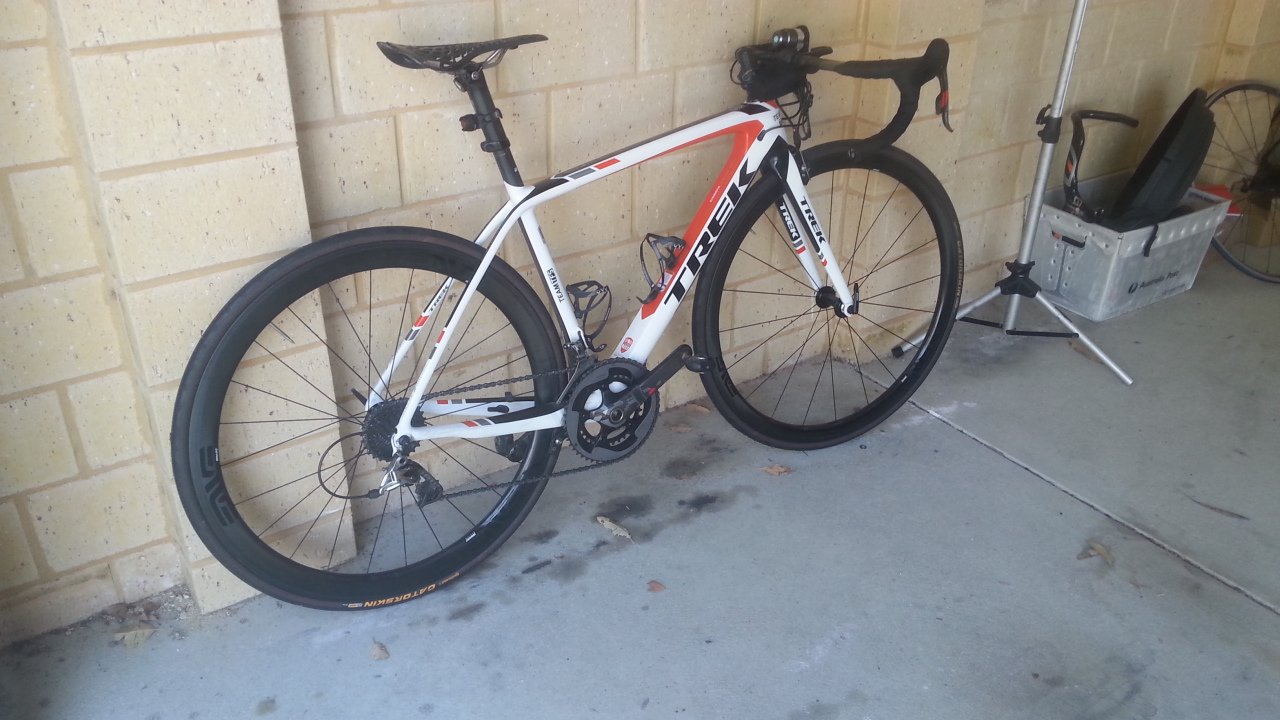
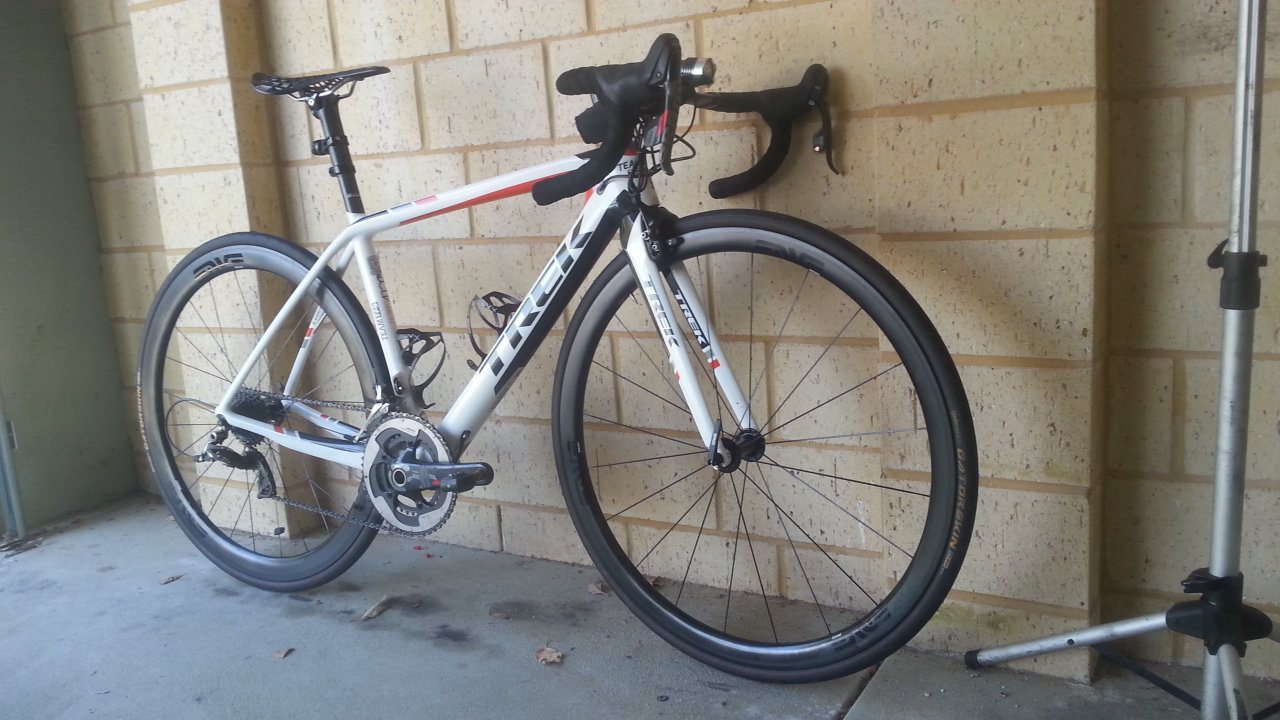
Wheels: Enve 3.4 SES
OWNERSHIP LONG TERM REVIEW
Now that I’ve owned the bike for 3.5 months, I know it’s not that long yet but I think it’s long enough to gauge what the maintenance will be moving forward.
Brake Rub
I mentioned in that initial review that I get brake rub especially on rainy day. I’m happy to report that I can now adjust my brake so it no longer rubs which I’m very happy about.
Cleaning
No problem with cleaning the bike. The paint was very well done and it’s not a matte paint so cleaning is very easy and doesn’t leave any stain. Cleaning the area around the crank obviously needs a bit more work (just like with any other bike, you will need to take off your crank to clean the surrounding area).
SRAM Red
3.5 months in with more than 3000km clocked in with the groupset and it’s still running as smooth as it was originally. I have no problem with shifting whatsoever.
Braking Power
I don’t have any problem whatsoever with the braking power. Both front brake and the hidden rear brake work as well as other bikes I’ve owned in the past. If anything it comes back to the brake pad and the braking surface of the wheel and not so much about the brakes nor their position on the Madone.
RIDING LONG TERM REVIEW
So how does it ride now that I’ve done more than 3000km on it? I will also give feedback based on my long hill ride. Please also see my Strava activity page for the ride stats: http://www.strava.com/activities/202974368/
I also did similar ride with my Roubaix S-Works with a cut-down route though: http://www.strava.com/activities/129300010
NOTE: This is my 1st weekend long hill ride after about 4 months off it due to winter and just personal commitments. Therefore, I may not have the same flexibility nor the strength I used to have because I used to do weekly long hill ride but not anymore.
Flat
I still believe that this bike is very great for doing breakaway ride. It just slices through the wind very-very well. Compared to my Roubaix S-Works I feel that I’m faster on the Madone. Am I really faster though? I think so. When I look back at my previous commute to work rides in Strava, with the exact wind speed, I either ride faster; or at the same speed but with less heart rate. It means that I’m more efficient on this bike.
Can it due to my increase fitness? Definitely but I definitely feel faster on the bike. It feels a bit duller on Roubaix S-Works when the day is windy.
In Perth we get at least 15-30kmh crosswind almost everyday. If you’re lucky you will only get very slight wind in one of the 30 days in month. If you’re unlucky, storm forms and the wind can be up to 50kmh. In the morning the wind is not as strong (eg. ~15kmh) but later on in the afternoon the strength usually increases.
When I did the long hill ride, since I’m not that strong of a rider, it took me about almost 7 hours to complete the 150km ride with 1650m elevation (as per my Strava ride). So I started at about 7AM and arrived home about 1.20PM. In the afternoon the ride felt a lot more painful and long due to fatigue I’ve built during the climbs. The crosswind then didn’t help either. But luckily I rode the Madone.
This bike definitely makes my pedaling a lot smoother. I could still push the same speed in the afternoon as I did when I first started the ride in the morning when my legs were all fresh. I remembered that on my Roubaix that my legs were simply struggling and I could only ride very slowly after KM 130; but not with the Madone.
I’m so surprised that I could still survive after 150km long hill ride especially this was my first time doing it after 4 months off it.
Climbing
Let me say that the Madone simply climbed superbly. Stiff and I felt that I didn’t lose any single power on every stroke I put on the pedal! Just simply awesome. I love the geometry with shorter wheelbase compared to Roubaix so when I climbed it didn’t feel like I was pulled backward. I put on a lot of personal records on the same climbs I did previously with my Roubaix. See my 2 Strava links above.
Both standing or sitting down the Madone simply performed. It helped my cadence to be higher than the usual. I could climb sitting down at 70-80RPM and standing at 65-70RPM. Seriously…I wish I can detail how it felt.
I felt no flex whatsoever.
Descending
Compared to my Roubaix, the Madone was a lot more stable during descend. Again, I achieved personal records for the same descend I did. I felt a lot safer descending on this compared to my Roubaix. Whether you have your arms on the hood or on the drops, the Madone was simply super stable.
Rough and Bumpy Road
Now this is where Madone loses a bit compared to my Roubaix. There were sections during the climb and flats which road surface was super rough. I don’t know what you call it, it’s asphalt but hasn’t been maintained for ages. They had some patches, gravels, etc. Anyway it’s super rough in my opinion. Let me tell you that riding on the Madone felt so bumpy on these roads.
Had the road been slightly smoother, the Madone would be fine. But on these very rough roads…man….it made climbing and riding so much harder. First of all the tires rolled worse due to greater resistance and secondly those vibrations were transmitted to your body by the Madone. And mind you, the Madone – as I initially reviewed – was in that middle ground between Tarmac S-Works and Roubaix S-Works in terms of comfort. I can’t imagine what it would be like to ride these roads on a harsher bike.
So on normal road the Madone was superb. I don’t even talk about silky smooth road. Normal asphalt or even country-out-of-town-road will be fine. But anything harsher than that, Madone struggles.
Sprinting
With the aggressive position I had on the Madone, sprinting is a lot easier. The bike is very stable and can help you hold your line very well. I often sprint when the traffic light is about to turn yellow and red and the Madone is very-very easy to sprint with.
It’s a stiff bike with some comfort built into it; and definitely it doesn’t waste any single power you put down through the pedal.
CONCLUSION
Still hands down, the best all-rounder bike I’ve ever owned. It feels solid on flats, cuts through the wind very well; and yet feels light and stiff through the climb. On the descend this bike is very stable and I feel very safe descending on it.
At the end of the day, after 7 hours on the saddle, I didn’t feel like I was beaten up badly. Sure I was tired because I haven’t done these long hill rides for ages; but it could have been worse with other bikes. As I mentioned earlier, the Madone helped and allowed me to still push the same speed in the middle of my fatigue.
There is nothing I can fault with the Madone. Therefore, it all comes back to the rider and his legs. As long as you have the legs, the Madone will help you push further.
Review is coming up for the Enve 3.4 SES wheelset.
Cheers,
Tommy
, - Posted by Tommy Segoro
INTRODUCTION
I have been in the hunting process for an excellent all-rounder wheelset. To me all-rounder means:
– Have some aero capabilities. I’m not a big fan of a shallow ie. 22-24mm wheel somehow with my type of pedaling I just can’t get a good power out of them.
– Very stiff for climbing. I have ridden various wheels from Shimano Dura Ace C35 2012, Chinese wheels, Mavic R-SYS SL 2012, stock Bontrager Race, stock Bontrager Race Lite TLR to Zipp Firecrest 2014 303 front/404 rear and I have to tell you (details later) that not-so-stiff wheels will make climbing very-very difficult especially when you are standing a lot.
– Does not feel heavy on the rear while climbing.
– Not affected (or slightly affected) by crosswind especially on flats and descending.
– Rear hub rolls well.
– ~1500gr max weight.
– I won’t need that much effort to change tires. This is a biggie for me. Some wheels I’ve had, depending on the tires you choose, are either difficult or very-very difficult (ie. blisters level difficult) to put tires on especially if you put on non-folding endurance tires eg. Gatorskins.
– Braking is a priority but not that important for me as my speed ain’t that great anyway.
Comfort is definitely not a big priority for me.
SPOILER ALERT
Let me tell you upfront that I can confidently say that the Enve 3.4 SES 2015 is the best all-rounder wheelset I’ve owned so far and definitely tick all the criteria I mentioned earlier. But let me go into more details.
RIDER PROFILE
Height: 170cm
Riding type: Commuting daily, weekend short or long hill rides. Never race.
Riding frequency: Commuting 40km 5 days a week. Short hill (~80km) or long hill (~130-150km) on either Saturday or Sunday.
Weight: 70-73.5kg (depending on season).
Strength: 200watt @ 160bpm.
Starting cycling: October 2010.
Bike: Trek Madone 7 2014 53.5cm top-tube.
Total bike weight (with Enve): 7.02kg
Total bike weight (with Zipp): 7.04kg
ENVE 3.4 SES 2015
I have been wanting to ride Enve since few years ago. The only reason why I never bought one was the cost! But now looking back I should have bought them anyway rather than wasting my money on other wheelsets that in the end don’t cater for what I’m looking for. So my wheel hunting journey continued and finally I purchased the Enve 3.4 which I am very content about right now and I can see myself riding it for a long time.
I purchased the Enve through a local Perth supplier who sourced directly from USA. Just in case you’re interested his name is Ben – 0420 982 695. Very nice guy and I have to admit that his price was the cheapest compared to other Enve online listings I’ve found. I bought them for $3000 while if you would have purchased them from online shop or LBS would have cost you $3400-$4000. All items are original with warranty and all that so I have no problem whatsoever purchasing from him.
The Enve came very profesionally packaged. It came with one box that catered for the 2 wheels instead of one box per wheel. Within it was also the Enve pouch that contained valve extender, Enve brake pads and user manual.
Rim tape was already applied on the wheel when I opened it.
The hub is Chris King R45. It is pretty loud with that unique bee-buzzing sound on freewheeling. I love it especially during descend. I did a short hill ride last week and my friend reckoned it sounded as if there was a motorcycle coming! And yep it’s that loud.
INSTALLATION
The front is 35mm deep and 26mm wide and the rear is 45mm deep and 24mm wide. Installing them on the bike was very straight forward except I had to take off some brake spacers for the front especially for it is a fairly wide wheel. Also with my Trek I only need to tighten the brake adjustment very-very little or else rubbing may occur due to the width of the wheel.
The rear one is slightly narrower so I could leave the spacer as it was on the bike originally.
Putting tires were very-very easy! It was as easy as – if not easier than – the Zipp wheel. I’m currently using Gatorskin 25mm for both front and rear.
RIDING EXPERIENCE / REVIEW vs ZIPP 303 FRONT/404 REAR
So how do they ride?
Flats
As I mentioned before, I prefer a deeper wheel than 22-24mm because somehow I can’t get the riding feeling I want out of the shallower rim.
With the rear one, the Enve gives a bit of weight but not heavy. The Zipp 404 rear on the other hand felt a bit heavier. I have not tried using the 303 rear but the 404 definitely felt a bit heavier than the Enve. Especially when there is a strong crosswind, the 404 just felt a lot heavier. What does this translate to my cycling? The Enve was easier to pedal with higher cadence than the 404. Does it mean that I’m faster? Very slightly (talking about 0.1kmh faster) – although my legs are less hurting since I can pedal with higher cadence. I think the 404 is better for time-trialing and when the wind is not that strong.
The Enve front feels lighter than the 303 and a lot less affected by crosswind since it’s a shallower rim.
Sprinting is also easier with the Enve. These wheels are very stiff and you don’t lose any energy when sprinting. The Zipps were supposed to be as stiff but somehow felt a lot duller on the sprinting especially that 404 rear. I’m just not a big fan of that 404 rear. It felt a bit heavier and jumping out of the saddle didn’t give you that immediate reaction. It’s like that turbo-lag on car with diesel engine.
On cross/yaw wind and headwind is where I think the Enve shines. I think this wheelset is very suitable for breakaways or leading at the front. It rolls really well and pedaling in the wind is a lot easier compared to the Zipp.
Climbs
I never understand what wheel stiffness truly means until I put my Bontrager stock wheels on. The stock wheels were only 100gr heavier but somehow they just didn’t respond on climbs. Pedaling felt soooo hard especially if you were off your saddle standing. I could definitely feel the flex difference on the stock wheels compared to the Enve and Zipps! They hurt my legs more.
Anyway, I didn’t feel any flex at all with the Enve. I could stand for an a lot longer period of time compared to my stock wheels. Compared to the Zipps the Enve was a lot snappier. Again, this could be caused by the 404 rear. The 404 felt a bit heavier and felt as if it was dragging you down while you stand on the climb. Did it make you faster on the Enve? Absolutely not. But they definitely made your legs pedaling more efficiently and smoother. I guess on a longer climb you would be less beaten down with the Enve.
Descending
This wheel is very-very fast on the descend. Was going down with 20-30kmh crosswind on the descend on my last hill climb and there was only a very-very tiny nudge on this wheel. I put on PB on the particular descent in Kalamunda, Western Australia. Check out the ride below from my Strava:
http://app.strava.com/activities/194129740
Braking
Now braking performance is what I’m not too impressed about. I was using Black Prince with my Zipps and the braking performance was on par if not better than alloy. With Enve, I have to use Enve’s own brake pads (or else the warranty is void); and to me they suck. On dry the performance is already way less impressive than the Zipps. It just feels so dull.
With the Zipp and Black Prince, you hit the break, the wheel just slows down so quickly. But not with the Enve and the stock brake pads. I’m not sure if it’s the surface or the brake pad but it just doesn’t give me the stopping power I need.
I’m yet to try it on wet conditions.
CONCLUSION
The Enve is definitely the best all-rounder wheelset I’ve ever owned. I’m only let down by the braking but I’m still curious to use Black Prince on it. Maybe I’ll do that when the warranty is running out anyway (but that would only happen in 2-5 years from now). So for the moment I’ll just stick with the Enve brake pads.



, - Posted by Tommy Segoro
INTRODUCTION
SharePoint development is never straight forward due to different options you can go ahead with namely:
1. Setup SharePoint on host and do the full development on host;
2. Use virtual machine (VM) environment to do the development.
I actually want to go a little bit further: that is how to set up the development environment itself to make it as efficient as possible.
BACKGROUND
I have been developing SharePoint for several years and I now have several projects on my development farm: about 15. I rarely delete any project just in case I need to re-visit or maintain it.
As the number increases, the speed is slower. Now I even have to use Powershell to create a new web application because using the GUI will just time out.
In this article I would like to discuss the options I mentioned earlier and the advantages/disadvantages of each option. And also I would like to share with you what I’ve done to make SharePoint development more efficient and time effective.
SPECS
Machine/VM specs is crucial in SharePoint development. 16GB of RAM is minimum especially SP 2013’s search services already occupy 3-4 GB of your RAM.
SSD is definitely required. I still remembered those days when I used 7200RPM disk for SP development, comparing it with the SSD I’m running right now, it’s way way much slower on the 7200 RPM.
VM vs HOST
I prefer using the host to be my development environment. I have tried several times before using VM with different configurations eg. internal SSD disk, external SSD disk, etc and just didn’t work well for me. The performance is way too slow. Obviously using VMs you have the benefit of destroying it and re-creating it easily should you make mistake or corrupt its configuration in any way. However, it comes with so many limitations eg. Internet access, backing-up files, risk of losing the source code, etc. All of these are configurable through the VM/Hyper-V console but you just have to spend a bit more time in the beginning to get it right. Then VM will also consume your host resources so you can’t utilise 100% of your resources.
Using host I find development a lot quicker. It will also enable you to utilise 100% of your host resources. The problem with this though is when you corrupt a configuration and you wish to re-install/re-configure. Obviously it will be very cumbersome to reformat your computer. I’m very lucky though because it never occurs to me that I need to reformat my laptop simply because I didn’t install SharePoint correctly.
Using VM as your development environment will only work if your host has a lot of resources and fast processors. At this particular client they run a proper racked-server with thousands of gigs of RAM and also top-of-the-range CPU. The DEV VM they provisioned for me was way faster than my laptop. However, at any other case where I have to use my laptop, using the host still works better for me.
SHAREPOINT CONFIGURATION
I have now consolidated my SharePoint web applications into just one. Rather than having one web app per project, I just use one. If I need to switch project, I simply do database backup/restore/detach/attach. This appears to be the quickest for me. When you only have one web application running on your farm, whenever you do WSP update, you only need to wait for few seconds. But if you start having more than 5, this will be 5-7 minute wait depending on how fast your processor is.
My laptop is i7 -3632QM with 16GB of RAM and 512GB SSD. When I had 10 web app running on it, it took me about 5 minutes everytime I do WSP update. And not just that, with 10 web app you can no longer use the Central Admin GUI to create, update or delete web app. It will just timeout most of the time especially the web app creation.
NOTE: I’ve also turned on virtualisation functionality in BIOS and my laptop running full power plan. So it’s the highest top performance option I can set on the laptop.
With backup/restore/detach/attach all you need to worry about is to ensure that all dependent solutions WSP are deployed to the web app. You can also play around with the alternate access mappings (AAM) to change the URL.
CONCLUSION
I’m now pretty happy with my configuration. Updating a WSP is only taking me about 30 seconds down from 5 minutes.
I still prefer developing from host because I get all my development tools, etc all installed in the centralised place rather than having to install on various DEV VMs for different purpose/project.
Would love to hear your thoughts,
Tommy
, - Posted by Tommy Segoro
INTRODUCTION
I have this scenario: In SharePoint 2010 or 2013 you can create a field/column which type is “Managed Metadata”. You can then attach it to a publishing page or list item.
What’s strange is, when you’re logged in as a Site Collection Administrator you can add, edit, delete list item or page fine. However, when you’re logged in as a Contributor, you can save the page/item but when you try to view or re-edit it, the Managed Metadata field is empty. Log back in using Site Collection Administrator and you can see that the field has been correctly populated. So the data is saved correctly by a Contributor except he can’t see it upon viewing or re-editing the item.
RESOLUTION
The problem is, there is a hidden list that is created in your site collection and used by the Managed Metadata Service which you need to give explicit access to. The location of this list is at http://yoursitecollection/Lists/TaxonomyHiddenList/AllItems.aspx. Open that list using Site Collection Administrator then go to List Permission.
In my case I only see 2 users added: Local System (full control) and NT Authority\Authenticated Users (read) which now explains to me why Contributors wouldn’t have view/edit access.
To resolve my problem I simply clicked “Inherit Permissions”. That way this list is also inheriting the site permission.
Alternatively, you can also add individual/group who needs to have edit access to your Managed Metadata field.
Hope this helps,
Tommy
, - Posted by Tommy Segoro
INTRODUCTION
Out of nowhere my SharePoint 2013 site (and has happened on my other 2010 farm, too) is timing out on a particular sub-site. The whole site still loads but when I go to this particular sub-site, I just got timeout.
After an intensive research I found out that when you publish a page in SharePoint, there is this bug that may corrupt the navigation items and end up creating duplicates. If you check in the database (simply go to the content database of your SP site in SQL Management Studio then run SELECT * FROM NavNodes), you will see thousands of duplicates for a particular page. Mine created about ~1000 duplicates.
This what causes the timeout. If you look in the log file you will see something like below:
==
07/16/2014 12:09:19.85 w3wp.exe (0x4B4C) 0x4A50 SharePoint Foundation Database d0d6 High System.Data.SqlClient.SqlException (0x80131904): Transaction (Process ID 106) was deadlocked on lock resources with another process and has been chosen as the deadlock victim. Rerun the transaction. at System.Data.SqlClient.SqlConnection.OnError(SqlException exception, Boolean breakConnection, Action`1 wrapCloseInAction) at System.Data.SqlClient.TdsParser.ThrowExceptionAndWarning(TdsParserStateObject stateObj, Boolean callerHasConnectionLock, Boolean asyncClose) at System.Data.SqlClient.TdsParser.TryRun(RunBehavior runBehavior, SqlCommand cmdHandler, SqlDataReader dataStream, BulkCopySimpleResultSet bulkCopyHandler, TdsParserStateObject stateObj, Boolean& dataReady) at System.Data.SqlClient.SqlDataReader.TryHasMoreRows(Boolean& moreRows) at System.Data.SqlClient.SqlData… 6dd9b59d-4588-918f-63ef-39784f1643db
07/16/2014 12:09:19.85* w3wp.exe (0x4B4C) 0x4A50 SharePoint Foundation Database d0d6 High …Reader.TryReadInternal(Boolean setTimeout, Boolean& more) at System.Data.SqlClient.SqlDataReader.Read() at Microsoft.SharePoint.SPSqlClient.ExecuteQueryInternal(Boolean retryfordeadlock) at Microsoft.SharePoint.SPSqlClient.ExecuteQuery(Boolean retryfordeadlock) ClientConnectionId:6dd9b59d-4588-918f-63ef-39784f1643db 6dd9b59d-4588-918f-63ef-39784f1643db
07/16/2014 12:09:19.85 w3wp.exe (0x4B4C) 0x4A50 Web Content Management Publishing 8vzf High PortalSiteMapProvider was unable to fetch children for node at URL: /About-Us, message: Value cannot be null. Parameter name: node.Parent, stack trace: at Microsoft.SharePoint.Publishing.CommonUtilities.ConfirmNotNull(Object value, String parameterName) at Microsoft.SharePoint.Publishing.Navigation.SPNavigationSiteMapNode.UpdateSPNavigationNode(SPNavigationNode node, SPNavigationNode previous, String name, String url, String description, String target, String audience, Boolean forceCreate) at Microsoft.SharePoint.Publishing.Navigation.SPNavigationSiteMapNode.UpgradeDraftSPNavigationNode(SPNavigationNode draftNode, SPNavigationNode previous) at Microsoft.SharePoint.Publishing.Navigation.PortalWebSiteMapNode.<>c__Displa… 6dd9b59d-4588-918f-63ef-39784f1643db
07/16/2014 12:09:19.85* w3wp.exe (0x4B4C) 0x4A50 Web Content Management Publishing 8vzf High …yClass3.<UpdateNavigationNodes>b__1() at Microsoft.Office.Server.Utilities.Security.SecurityUtilities.RunWithAllowUnsafeUpdates(SPWeb web, Action secureCode) at Microsoft.SharePoint.Publishing.Navigation.PortalWebSiteMapNode.PopulateNavigationChildrenInner(NodeTypes includedTypes) at Microsoft.SharePoint.Publishing.Navigation.PortalWebSiteMapNode.PopulateNavigationChildren(NodeTypes includedTypes) at Microsoft.SharePoint.Publishing.Navigation.PortalSiteMapNode.GetNavigationChildren(NodeTypes includedTypes, NodeTypes includedHiddenTypes, Boolean trimmingEnabled, OrderingMethod ordering, AutomaticSortingMethod method, Boolean ascending, Int32 lcid) at Microsoft.SharePoint.Publishing.Navigation.PortalSiteMapNode.GetNavigationChildren(NodeTypes includedTypes, NodeTypes incl… 6dd9b59d-4588-918f-63ef-39784f1643db
07/16/2014 12:09:19.85* w3wp.exe (0x4B4C) 0x4A50 Web Content Management Publishing 8vzf High …udedHiddenTypes, OrderingMethod ordering, AutomaticSortingMethod method, Boolean ascending, Int32 lcid) at Microsoft.SharePoint.Publishing.Navigation.PortalSiteMapNode.GetNavigationChildren(NodeTypes includedHiddenTypes) at Microsoft.SharePoint.Publishing.Navigation.PortalSiteMapProvider.GetChildNodes(PortalSiteMapNode node, NodeTypes includedHiddenTypes) 6dd9b59d-4588-918f-63ef-39784f1643db
==
RESOLUTION
The resolution to this issue is actually to remove the duplicates but you can only do this from Powershell. From researching online I happened to find this Technet forum post:
http://blogs.technet.com/b/saantil/archive/2013/03/31/sps-2013-error-connecting-to-subsite-an-unexpected-error-has-occurred.aspx
There is a Powershell script that you can use but for easier use I paste it below. Put this in a .ps1 file then simply run it using the SP 2013 Powershell. It will ask you for your root site collection URL.
To make it easier, you can also download the script here. Rename to .ps1.
param
(
$url = $(Read-Host -Prompt “SiteCollection Url”)
)
Add-PSSnapin Microsoft.SharePoint.PowerShell -ErrorAction SilentlyContinue
$Logfile = “duplicates_log.txt”
Function LogWrite
{
Param ([string]$logstring)
Add-content $Logfile -value $logstring
}
function tryDeleteNode
{
param($node,$dictionary,$nodeCollection)
$title = $node.Title
if(!$dictionary.ContainsKey($title))
{
$dictionary.Add($node.Title,$node.Url)
}
else
{
if($dictionary[$title] -eq $node.Url)
{
if($node.Children.Count -eq 0)
{
echo ” -> Deleting Duplicate Node: $title”
$nodeCollection.Delete($node)
$global:didDelete= $true
$temp = (get-date).ToString() +”;”+ ($site.Url) +”;”+ ($title)
echo “$temp”
LogWrite $($temp)
}
else
{
echo ” -> Dupe Node $title has children, Skipping…”
}
}
else
{
echo ” -> Duplicate title $title found, but mismatched link, Skipping…”
}
}
}
function deleteNodesRecurse
{
$nodes = @{}
foreach($node in $quickLaunch)
{
$childNodes = @{}
foreach($child in $node.Children)
{
tryDeleteNode -node $child -dictionary $childNodes -nodeCollection $node.Children
}
tryDeleteNode -node $node -dictionary $nodes -nodeCollection $quickLaunch
}
}
function deleteGlobalNodesRecurse
{
$nodes = @{}
foreach($node in $gnavNodes)
{
$childNodes = @{}
foreach($child in $node.Children)
{
tryDeleteNode -node $child -dictionary $childNodes -nodeCollection $node.Children
}
tryDeleteNode -node $node -dictionary $nodes -nodeCollection $gnavNodes
}
}
$sitecoll = Get-SPSite $url
write-host “SiteCollection: ” $sitecoll.URL
foreach ($site in $sitecoll.AllWebs)
{
write-host ” -> Site: ” $site.URL
do
{
$quickLaunch = $site.Navigation.QuickLaunch
$global:didDelete = $false
deleteNodesRecurse
$pub= [Microsoft.SharePoint.Publishing.PublishingWeb]::GetPublishingWeb($site)
$gnavNodes = $pub.Navigation.GlobalNavigationNodes;
deleteGlobalNodesRecurse
}
while($global:didDelete)
$site.Dispose()
}
$sitecoll.Dispose()
Hope this helps,
Tommy
We provides you the best Services in our themes.
Click on the link below to see a full list of clients which we have developed solutions and provided consultancy for.
We are solution-centered and not application-centered.
Being creative and having fun and yet still delivering a fantastic service is the center of our values.
TFS Consulting Services guarantees delivery that is within budget and deadline or you engage us for free.

Implementing IT solution does not have to be difficult. TFS Consulting Services has a lot of resources on planning and methodologies that will ensure successful delivery of your IT solution. TFS Consulting Services has been around in the web industry for more than 10 years and has experienced all the successes and failures of various type of IT deployment.

Do you need a technical resource? TFS Consulting Services can also provide you with technical resource for developing ASP.NET (C# and VB.NET), SharePoint (2003, 2007, 2010, 2013) and MS CRM applications. Our resource is an Microsoft Certified Personnel (MVP) and Microsoft Certified Technology Specialist (MCTS) in all ASP.NET, SharePoint and CRM.

Make sure your IT implementation is robust and scalable. TFS Consulting Services can provide consulting and advice on industry’s best practice on various web-related areas such as website security, design and usability, application-specific (such as SharePoint)’s best practice, Search Engine Optimisation (SEO), coding standards and many others.

Finally TFS Consulting Services provides you with solution development service. We mainly work with Microsoft technologies (ie. .NET and SQL Server), however we are also capable of developing with PHP and MySQL. If you ever need any business process automation, integration and solution development work, we are the trusted expert you should go to.
For more detailed service offerings please visit our Solutions page.
Tommy Segoro
tommy@tfsconsulting.com.au
+61 404 457 754
© TFS Consulting Services 2026. All rights reserved.